Variable Names
The n mark prints each argument next to its source expression. Neoprint reads
the source line you called it from, so you never have to type 'name ='
yourself.
import neoprint as np

name = 'Alice'
age = 30
city = 'New York'
np.show(name, age, city, ':n')
main.py:6 | name = "Alice"; age = 30; city = "New York"
Expressions work too
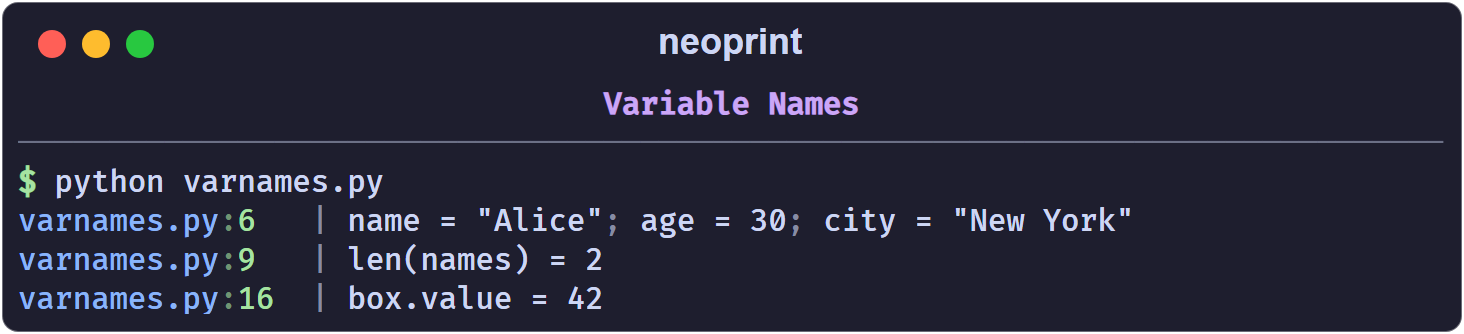
Plain names are only the beginning. Function calls and attribute accesses are also reconstructed:
names = ['Alice', 'Bob']
np.show(len(names), ':n')
class Box:
    def __init__(self):
        self.value = 42

box = Box()
np.show(box.value, ':n')
Enable it globally
If you want variable names on every call without repeating the mark, turn on the configuration switch:
import neoprint as np

np.config(show_varnames=True)

name = 'Alice'
np.show(name)       # name = "Alice"
Restore the default with np.config(show_varnames=False) or
np.config.reset().
Limitations
- The function has to keep a recognizable name. Neoprint only inspects
calls to
print,show,debug,info,success,warning,error,format, andformat_list. If you alias the import, for examplefrom neoprint import show as s, the call no longer looks like one of those names and the mark cannot resolve the arguments. Usefrom neoprint import print(the name isprint) instead of renaming. - Literals have no name.
np.show(42, ':n')prints42, because there is nothing to reflect. - Truthiness of the mark.
:n0hides names,:n1(bare:n) shows them.
How it works, briefly
The source file of the calling frame is parsed with ast and cached per
modification time. The analyzer finds the Call node on the reported line and
reads the source segment of each argument. That is why the names are exactly
what you wrote — including spacing inside longer expressions — and why the
feature costs one file parse per source change, not per call.
See also Source Layers for how the head of a message is resolved.