Verbosity Levels
The v mark colors a message according to its severity. The scale runs from
v0 (debug) to v8 (error); odd numbers are dim variants of the even one
above them.
import neoprint as np

np.show(':v0', 'v0 debug')
np.show(':v1', 'v1 negative info')
np.show(':v2', 'v2 positive info')
np.show(':v3', 'v3 weak success')
np.show(':v4', 'v4 success')
np.show(':v5', 'v5 weak warning')
np.show(':v6', 'v6 warning')
np.show(':v7', 'v7 weak error')
np.show(':v8', 'v8 error')
| Level | Meaning | Color |
|---|---|---|
v0 | debug | gray |
v1 | negative or serious info | magenta |
v2 | positive or neutral info | blue |
v3 | weak success | dim green |
v4 | success | green |
v5 | weak warning | dim yellow |
v6 | warning | yellow |
v7 | weak error / failure | dim red |
v8 | error / failure | red |
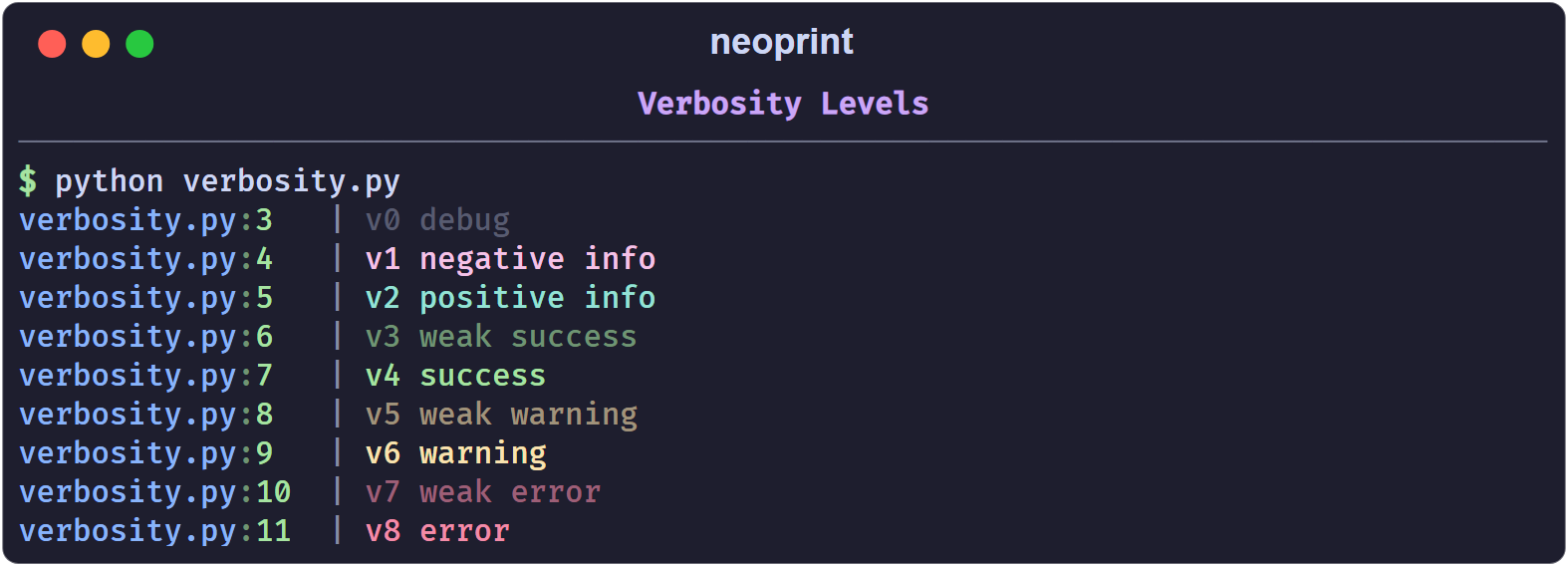
The color covers the whole body of the message, not the source head.
Shorthand functions
For the levels you use most, import the ready-made helpers:
from neoprint import debug, info, success, warning, error

debug('user has come here')
info('welcome to the city')
success('file created')
warning('target file exists, will overwrite it')
error('failed to create the file')
Each helper is just a call with the matching mark already applied, so marks can still be appended:
error('failed: {}'.format(err), ':d') # red message wrapped by dividers
The helpers are functools.partial objects, not separate implementations, so
they accept the same arguments as np.show.
Choosing a level
A useful rule of thumb:
v0/v1for traces you read while developing;v2/v4for confirmations the user of your program cares about;v6for recoverable surprises;v8for failures that stop the current task.
If you only need colored text and not a semantic level, prefer inline markup
in :r1 mode — see Rich Text.