Timing
The t mark appends a timestamp to the message. It is useful for tracing how
long stages take without exporting metrics.
from time import sleep
import neoprint as np

np.show(':t', 'starting')
sleep(0.2)
np.show(':t', 'loaded config')
sleep(0.5)
np.show(':t', 'connected')
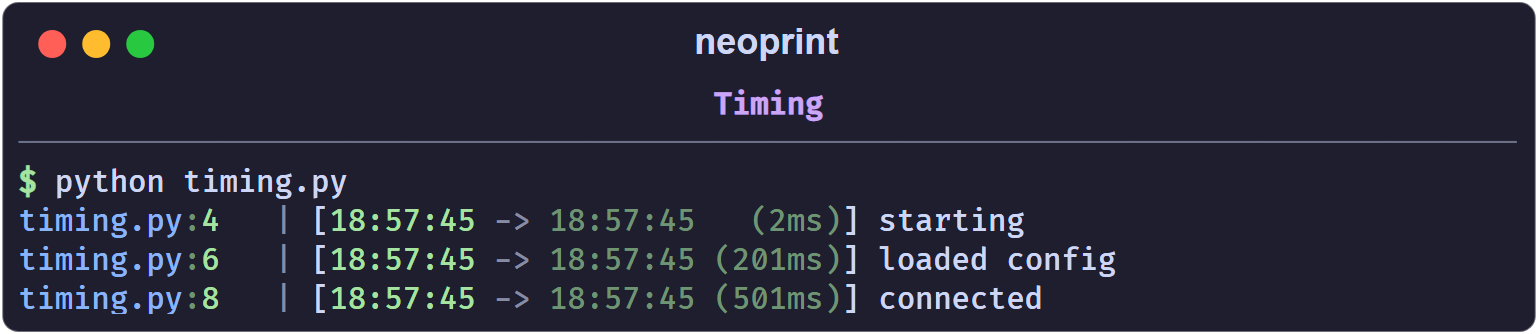
The prefix shows the previous timestamp, the current one, and the delta. Formatting scales automatically: milliseconds for short gaps, seconds, minutes, hours for long ones.
The four variants
| Mark | Means |
|---|---|
:t1 | absolute timestamp only, no delta |
:t2 | time since the previous :t2/:t3 call (bare :t) |
:t3 | time since the scope timer started, or since :t0 |
:t0 | reset the timer |
:t2 and :t3 share one “instant” pointer, so alternating them measures each
step against the previous call. :t0 moves that pointer to now and restarts
the current scope’s timer.
Scopes
Inside np.scope(), :t3 measures from the moment the scope was entered:
with np.scope(name='job'):
    np.show(':t3', 'start')
    sleep(1)
    np.show(':t3', 'one second into the job')
Outside a scope, :t3 measures from the most recent :t0.
Practical pattern
:t is most useful as a drop-in replacement for ad-hoc
time.perf_counter() logging:
np.show(':t', 'begin download')
data = download()
np.show(':t', 'downloaded {} bytes'.format(len(data)))
np.show(':t', 'done')