Dividers
The d mark frames a message with a horizontal rule. It is a lightweight way
to separate sections in a long run of output.
import neoprint as np

np.show(':d', 'Section title')
np.show('some line')
np.show('another line')
main.py:3   | ──────────────────── Section title ─────────────────────
main.py:4   | some line
main.py:5   | another line
The rule spans the console width; the text you passed sits in the middle.
Variants
| Mark | Look |
|---|---|
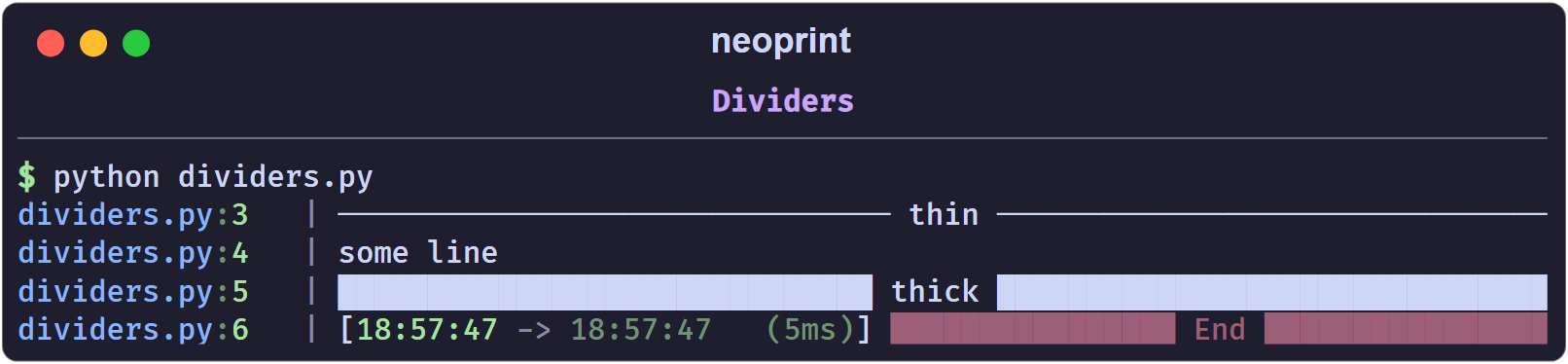
:d1 | thin line (bare :d) |
:d2 | thick block line |
np.show(':d1', 'thin')
np.show(':d2', 'thick')
Interaction with other marks
:dcannot be combined with:l— a divider needs a single-line body. Combining them raises anAssertionError; see How Markup Works.:dturns:r2off, because:r2produces multi-line layouts too.- Any other mark, such as
:v8or:i, still applies:np.show(':d2v7t', 'End')yields a thick divider with a timestamp, rendered in thev7(dim red) style.
Shorthand
from neoprint import divider

divider('Section title')