Index Counters
The i mark attaches a running counter to the message, so sequences are easy
to follow without writing print(i, ...).
import neoprint as np

np.show(':i2', 'first')
np.show(':i2', 'second')
np.show(':i2', 'third')
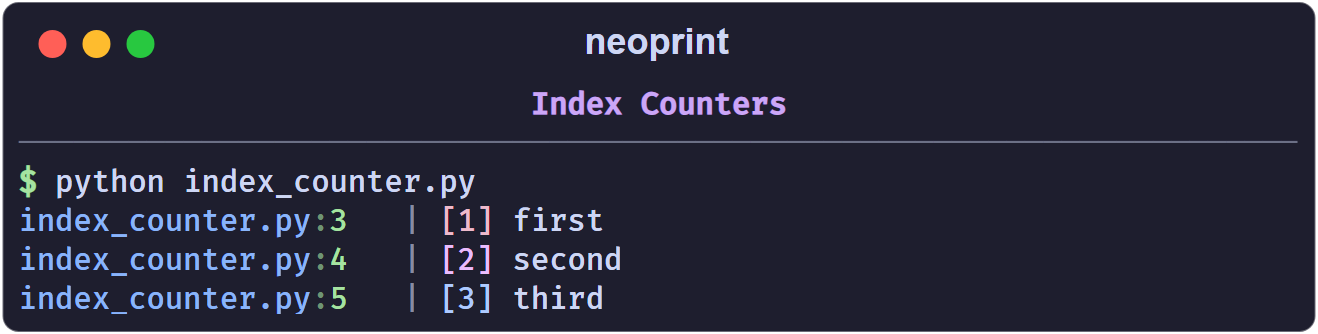
Every counter is rendered as [n] before the body, in a color derived from its
frame, so values stand out from the text.
The four counters
| Mark | Scope | Counter increments |
|---|---|---|
:i1 | one per source line | every time that line runs |
:i2 | one per scope | every call in the same function, class body, module, or np.scope() block |
:i3 | global | every call, anywhere |
:i0 | — | resets all counters |
Bare :i is :i1.
Line-level (:i1)
Best for loops and repeated single lines:
for _ in range(3):
    np.show(':i1', 'line')
main.py:2   | [1] line
main.py:2   | [2] line
main.py:2   | [3] line
Two different lines each start at [1], because they own separate counters.
Scoped (:i2)
Best when several lines form one logical stream. The scope is the enclosing function (or class body, or module):
def stage():
    np.show(':i2', 'step one')
    np.show(':i2', 'step two')

stage()
stage()
main.py:3   | [1] step one
main.py:4   | [2] step two
main.py:3   | [3] step one
main.py:4   | [4] step two
Global (:i3)
A single counter shared by the whole program:
np.show(':i3', 'G1')
np.show(':i3', 'G2')
main.py:1   | [1] G1
main.py:2   | [2] G2
Resetting
np.show(':i0')      # reset every counter
np.show(':i', 'back to [1]')
Custom scopes
np.scope() opens a named region. Inside it, :i2 counters are keyed by the
scope name instead of the function, which lets unrelated blocks share — or
deliberately not share — a counter:
with np.scope(name='download'):
    np.show(':i2', 'file A')
    np.show(':i2', 'file B')

with np.scope():                 # anonymous scope
    np.show(':i2', 'anonymous 1')
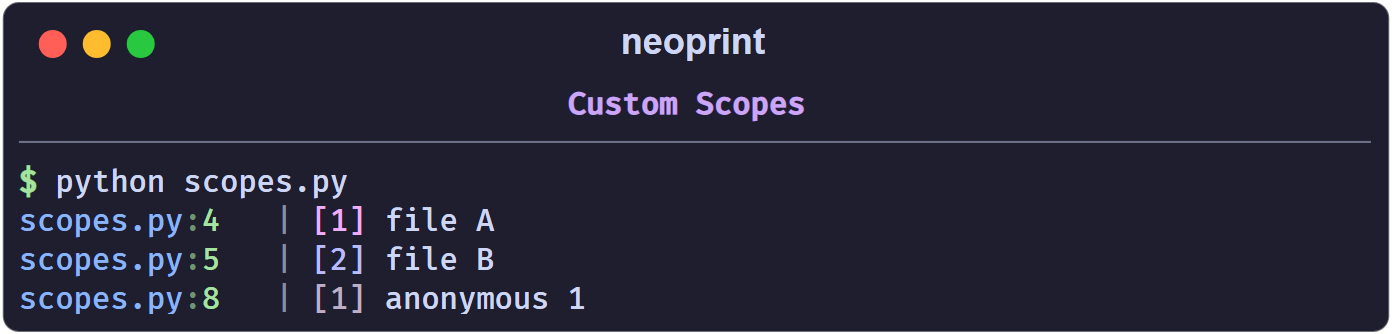
Scopes also give :t3 its own timeline; see Timing.
Colors
Counter colors are generated per source frame from a bright hex palette and
rendered with terminal true color. You do not choose them; they only serve to
tell frames apart. :i3 is always red.
Shorthand
np.index(x) is np.show(x, ':i2').