Exception Printing
The e mark decides what happens when an exception object is among the
arguments.
:e0 — plain
No special handling; the exception is printed like any other value.
import neoprint as np

try:
    1 / 0
except ZeroDivisionError as e:
    np.show(e, ':e0')
main.py:6 | division by zero
:e1 — red message
The message is printed in red, without a traceback:
np.show(e, ':e1')
Use it when you only want to signal a failure, not explain it.
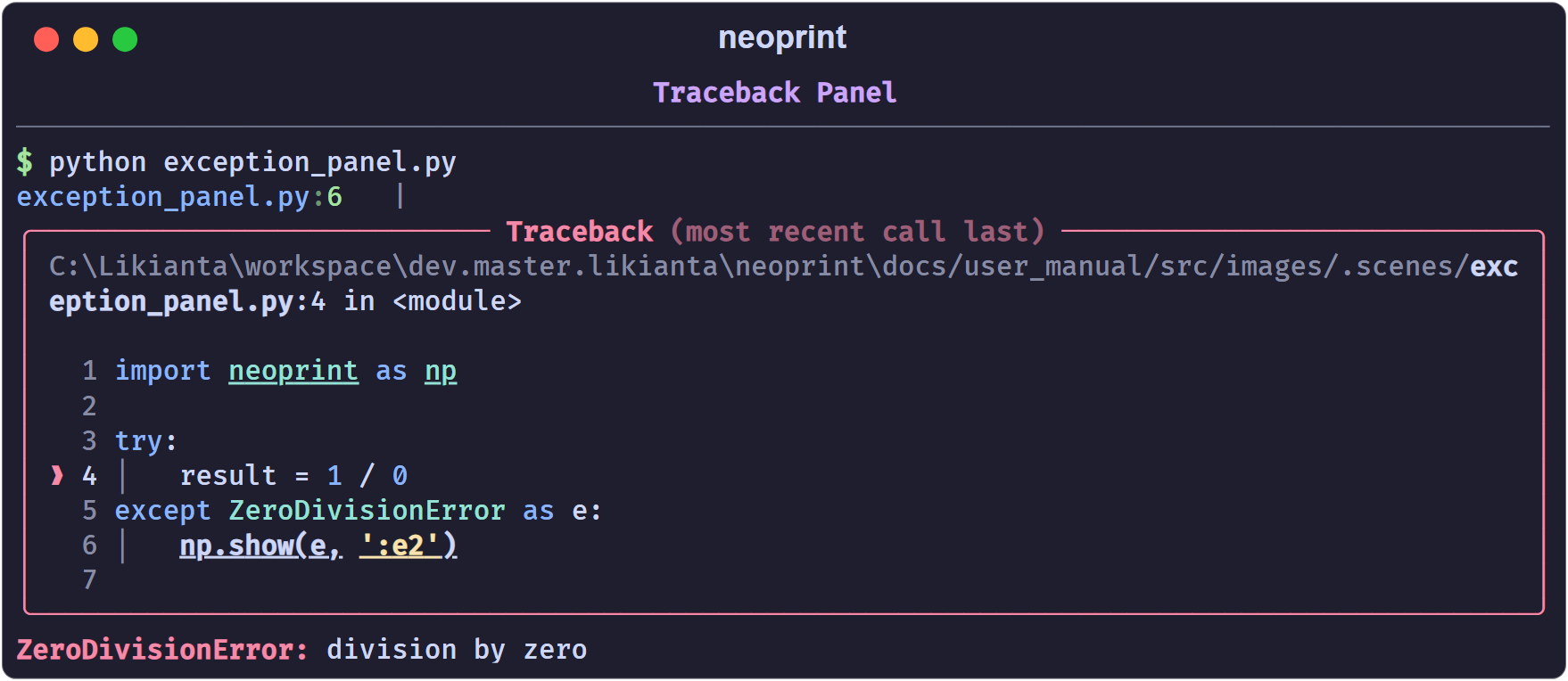
:e2 — traceback panel (default)
This is what bare :e does. The exception is rendered through Rich’s traceback
renderer:
np.show(e, ':e2')
The panel includes the source snippet of every frame, with the failing line marked.
:e3 — traceback with locals
Same as :e2, plus the local variables of each frame:
np.show(e, ':e3')
Useful when the bug depends on values you cannot guess from the code. Locals
whose names start with dunder or sunder (__x__, _x_) are hidden.
Printing the current exception
Inside an except block you can omit the argument entirely; neoprint reads the
current exception from sys.exc_info():
try:
    load_config()
except Exception:
    np.show(':e')       # same as np.show(':e2')
Combining with other marks
e combines freely with v, d, and i:
np.show(e, ':v8') # one red line, no traceback
Shorthand
from neoprint import exception

try:
    ...
except Exception as e:
    exception(e)        # same as np.show(e, ':e2')
Global excepthook
When config.rich_traceback is on (the default), uncaught exceptions are
printed by Rich’s excepthook instead of Python’s bare traceback, without any
call to np.show. Set show_traceback_locals to include locals there too:
import neoprint as np

np.config(show_traceback_locals=True)
See Configuration.